 Wiki
On a phone, select View → Show all to reveal Link AI. After Wi-Fi connects, the LED matrix shows the last IP octet for about one minute. An unbound Duck repeats a spoken instruction three times to open its current IP in a browser and complete AI binding.
Bind the complete audio/video robot to an AI agent, then verify the microphone, speakers, camera, light, ToF and motion. The cockpit is at http://<board-ip>/; leave the robot stationary and supported during the first audio tests.
Choose the service region
| Region | Agent service | Default language |
|---|---|---|
| Global | Global agent platform | English; wake word “Hey Ducky” |
| China | China agent platform | Chinese; use the wake word shown in that region’s interface |
Select the region in the cockpit’s AI voice settings before binding. The saved selection takes priority. Without a saved selection, the App checks existing binding data; when both regions are present it selects China. Accounts and bindings are separate between regions, and changing the selector does not migrate a bound device.
Bind the robot
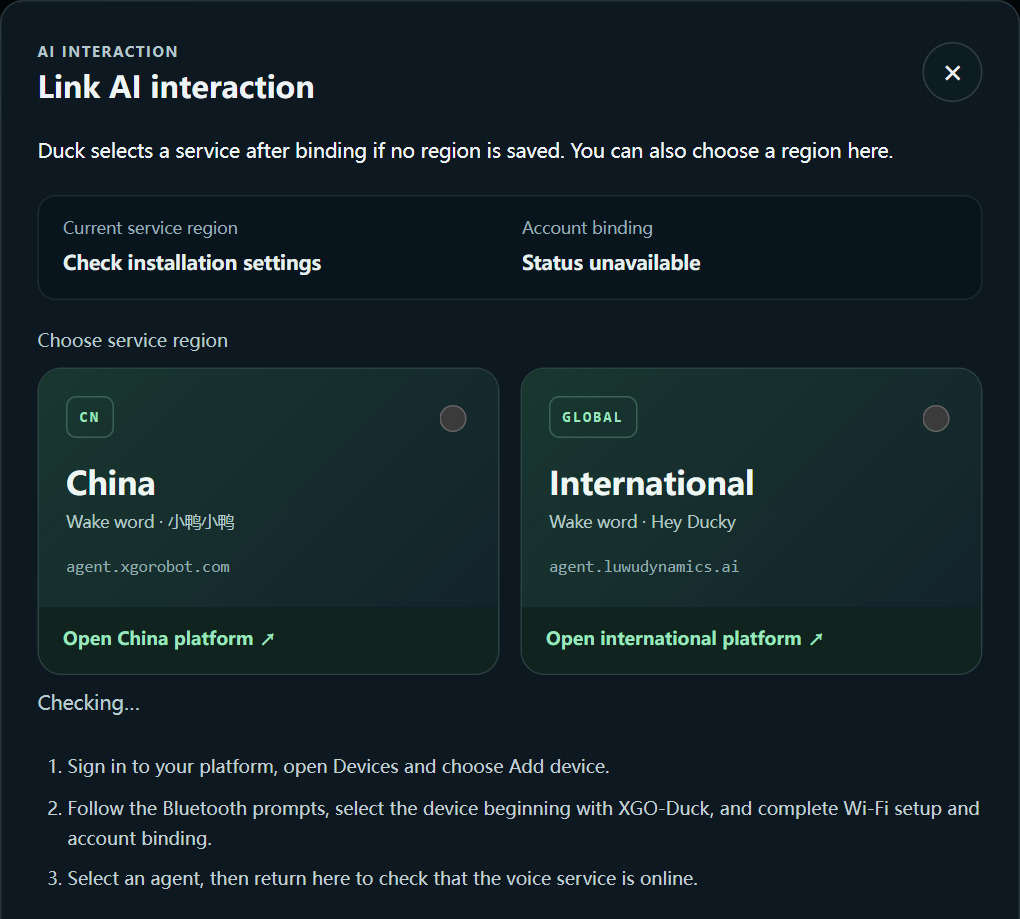
Create or sign in to an account on the selected platform and prepare an agent. If the robot belongs to another account, have the previous owner unbind it first.
In Chrome or Edge on a supported device, use the cockpit’s Bluetooth binding entry. Turn on Bluetooth, grant the requested permission and choose the nearby Duck.
On an iPhone, use the supported Global app or the China WeChat mini program for the selected service instead of relying on Web Bluetooth. The cockpit provides the corresponding entry.
Finish binding and confirm the robot is shown as bound. Stop microphone monitoring, recording and speaker tests, then wait for the agent to be ready before speaking.
Have the first conversation
For Global service, say “Hey Ducky”, wait for the listening prompt, then speak a short question.
Set a moderate speaker volume. In a noisy room, move closer and pause until the listening indication appears.
If no speech is heard, test speakers and microphone separately in Camera and audio. A successful binding does not by itself prove that audio hardware works.
Verify the complete robot
ToF still undetected after reboot: If the connected ToF is still missing after the acceptance reboot, mark it “pending retest.” Manually turn Duck’s power switch off and on once. After startup, check /api/tof/status again for state=ranging, fresh=true, an increasing seq and valid_zones > 0. Do not mark the sensor as passed before retesting.
| Function | Acceptance check |
|---|---|
| Camera | Live preview changes when the scene moves; a photo can be captured |
| Fill light | The light responds to both on and off commands |
| Speakers | Test audio is audible from the connected speakers |
| Microphone | Monitoring or a short recording captures sound near the robot |
| ToF | A nearby object changes the live grid and valid distance readings |
| AI voice | Wake, ask a question and hear the answer |
| Movement | Default pose and a short low-speed walk work after calibration |
Completion check
Every function above has been checked; log any unavailable module separately.
Understand Stop versus Torque off before handing the robot to another user.