
Developer Guide
This guide is for developers who want to read RIG-Omni source code, add actions, tune balance, port hardware, or extend interaction tools for RIG-Hover.
Architecture #
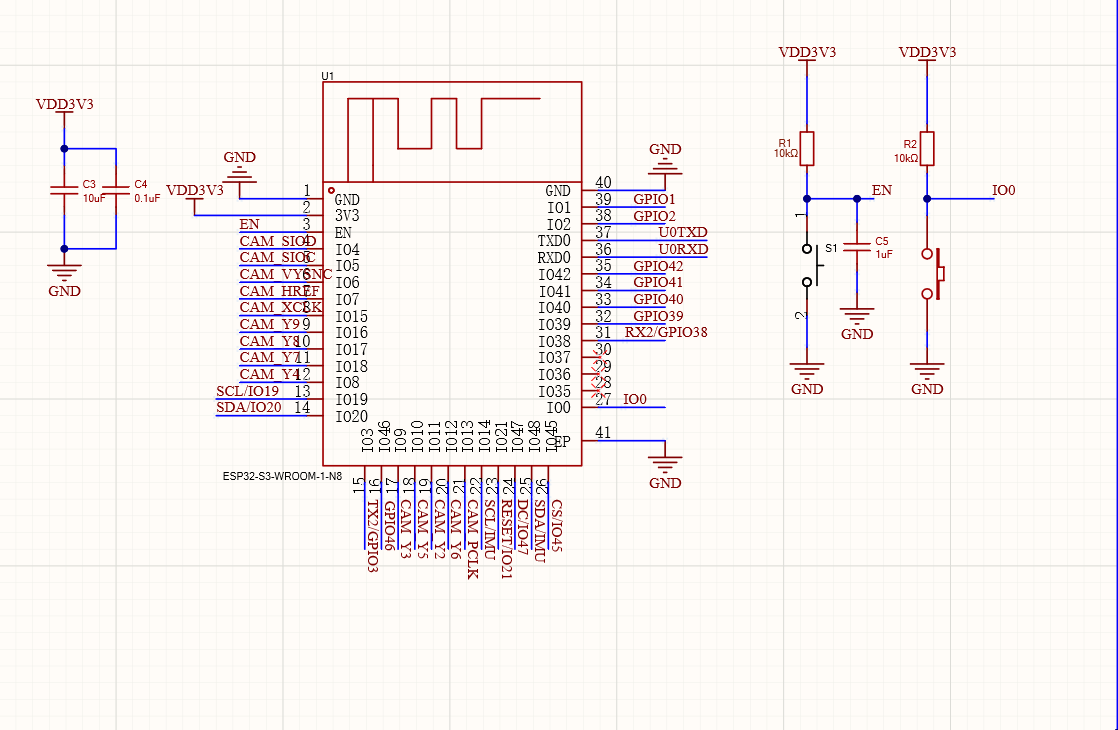
RIG-Hover adopts a highly integrated single-chip architecture. All sensing, control, and AI logic run on a single ESP32-S3 — no external co-processor is needed. This approach delivers high performance while reducing component count and simplifying development.
The project provides open-source resources including schematics, 3D models, firmware code and component lists, plus an assembly tutorial. It is well suited for learning motion control, large-language-model integration, multi-modal systems, and IoT communication.
Hardware Abstraction Layer
- MCU: ESP32-S3-WROOM-1-N16R8 (Dual-core 240 MHz, 2.4G Wi-Fi + BLE 5.0, 16 MB Flash, 8 MB PSRAM)
- Motion bus (UART): TX/RX serial bus driving 1 head servo (XGO serial protocol) and 2 serial FOC wheel motors, with ID-based addressing and status feedback, enabling differential drive and self-balancing.
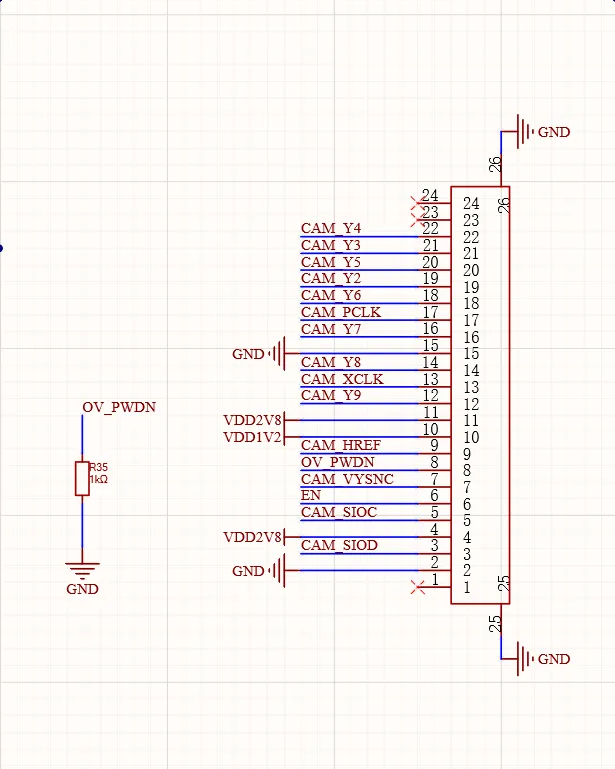
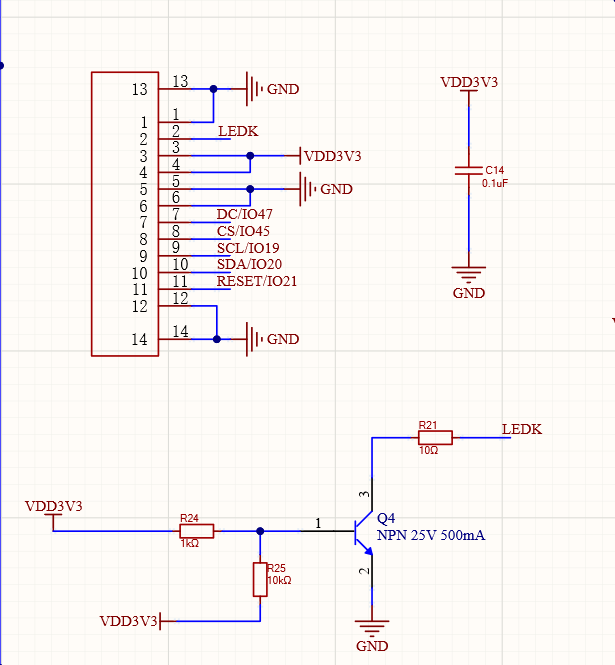
- Vision link (DVP/SPI): GC9A01 240×240 round LCD refreshes expressions over SPI; GC0308 camera captures images via DVP interface.
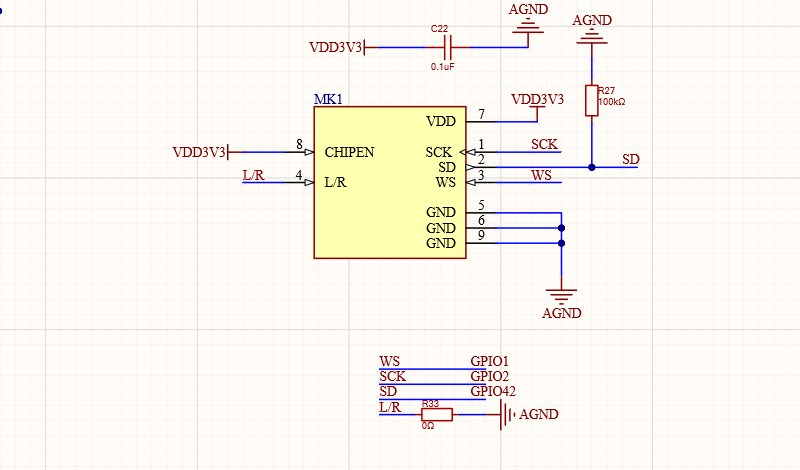
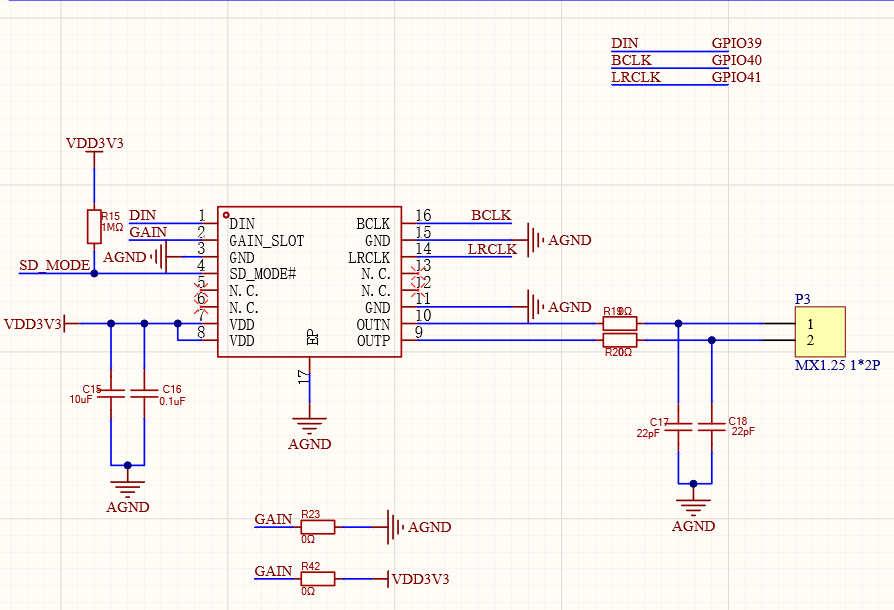
- Audio system (I²S): INMP441 MEMS digital microphone for audio input; MAX98357A amplifier drives an 8 Ω 2 W speaker.
- Attitude sensing (I²C): On-board 6-axis IMU (QMI8658C) for real-time attitude estimation and self-balancing control.
Main controller
Vision link — camera & display
Audio system — microphone & amplifier
Board Startup
HoverBoardis registered with:
DECLARE_BOARD(HoverBoard);The constructor performs the main hardware setup:
InitializeSpi()

InitializeLcdDisplay()

InitializeButtons()

InitializeTools()

InitializeCamera()

InitializeUart()

InitializeController()

InitializeBootButton()

imu_init()

create xgo_control task

create xgo_rx task

create imu_read_once task
Core Tasks
Task | Main function | Role |
|
| Updates robot state, computes LQR balance, sends servo and wheel torque commands |
|
| Parses UART feedback from wheel motors and head servo |
|
| Updates roll, pitch, yaw, and angular velocity |
Important Variables
Variable | Meaning |
| Target forward velocity |
| Target yaw velocity, retained for command compatibility |
| Target head servo angle |
| Current head angle feedback |
| Left/right wheel velocity feedback |
| Left/right accumulated wheel position |
| Body position estimate |
| Average wheel velocity; historical spelling is retained |
| IMU attitude variables |
| Pitch angular velocity feedback |
| Balance target position |
| Balance target heading |
| Balance zero-angle offset |
| 0 disables torque, 1 enables balance control |
| LQR feedback gains |
Motion Control
The active balance path is LQR-style full-state feedback:
pitch_ref = imu_zero * cosf(q_head * PI / 180.0f);

lqr_x  = wheel_x - stable_pos;

lqr_vx = wheek_vx - vx;

lqr_q  = pitch - pitch_ref;

lqr_dq = dq;


temp_u = -(lqr_k[0] * lqr_x

        + lqr_k[1] * lqr_vx

        + lqr_k[2] * lqr_q

        + lqr_k[3] * lqr_dq);
Yaw is added as differential torque:
yaw_u = k_yaw * (yaw - q_head - stable_yaw);

tor1 = -temp_u + yaw_u;

tor2 =  temp_u + yaw_u;
If robot_state == 0, the wheel torque output must be zero.
MCP Tools
Tool | Parameter | Behavior |
|
| Sets |
|
| Adds to |
|
| Adds to |
Development rules:
- MCP callbacks should only update target variables.
- Do not block for long periods inside callbacks.
- Let the real-time control loop execute the movement.
- Keep initial ranges conservative.
Web Debug Server
When Wi-Fi is connected, open:
http://<RIG-Hover-IP>/Interfaces:
GET /api/data

GET /api/set?i=<index>&v=<value>
Use this server only on a trusted LAN. Do not expose it to the public internet.
Extension Patterns
Add a New Action
Prefer a target-based tool:
mcp_server.AddTool("self.robot.set_motion_target",

    "Set RIG-Hover motion target",

    PropertyList({

        Property("distance", kPropertyTypeInteger, -20, 20),

        Property("yaw", kPropertyTypeInteger, -90, 90),

    }),

    [this](const PropertyList& properties) -> ReturnValue {

        stable_pos += properties["distance"].value<int>();

        stable_yaw += properties["yaw"].value<int>();

        return true;

    });
Add a Debug Variable
Modify hover_debug_server.cc:
VAR_LABELS
set_handler()switch statement
/api/datafields if readback is needed
Change Hardware Pins
Modify board_config.h, then verify:
- UART TX/RX matches motor bus wiring.
- IMU I2C pins match PCB routing.
- Camera SCCB/I2C does not conflict with IMU.
- Touch GPIO is not reused by another peripheral.
Development Safety
- Keep fall detection enabled.
- Keep torque cutoff enabled.
- Never write wheel torque directly from voice or network callbacks.
- Do not allocate memory or perform network operations inside
xgo_control().
- Avoid high-frequency logging in real-time control paths.
- Test every hardware change in suspended, hand-held, and free-standing stages.